Mailchimp integration with Ory Actions
Mailchimp is an email marketing platform that provides tools and services to help businesses send marketing emails, newsletters, and automated campaigns to their customers. It allows you to create, manage, and send emails to your subscribers, as well as segment and target specific groups of subscribers based on their interests and behaviors.
There are two main subsystems of Mailchimp that are of interest:
- Mailchimp email campaign tools - available from the main Mailchimp dashboard, the campaign tools enable you to organize and manage mass mailings to specific audiences (subscriber lists).
- Mailchimp Transactional Email - available from the Mandrill app dashboard, Mailchimp transactional email is a paid optional add-on for Mailchimp for managing transactional emails, which are user-specific emails sent to one user at a time.
In fact, it is the transactional email subsystem that is most relevant to the Ory integration use case. A transactional email is an automated email message sent to an individual user, in response to some event or interaction with your application. For example, when a user signs up to your website for the first time, this might trigger a welcome email to be sent to their email address. This is where the integration with Ory comes in. You can configure Ory Actions to trigger transactional emails in response any event that occurs in a self-service flow such as login, registration, or account validation.
The advantage of integrating Ory with the Mailchimp Transactional Email system is that Mailchimp sends these emails on your behalf and is able to track all of the transactional emails that pass through the system. You can use the Mandrill dashboard to track all of the inbound and outbound transactional emails and generate reports and analytics for this email traffic.
How Ory integrates with Mailchimp
The following diagram illustrates how Ory integrates with the Mailchimp Transactional Email system. In this particular example, we consider the case where a transactional email is triggered immediately after a user signs up.
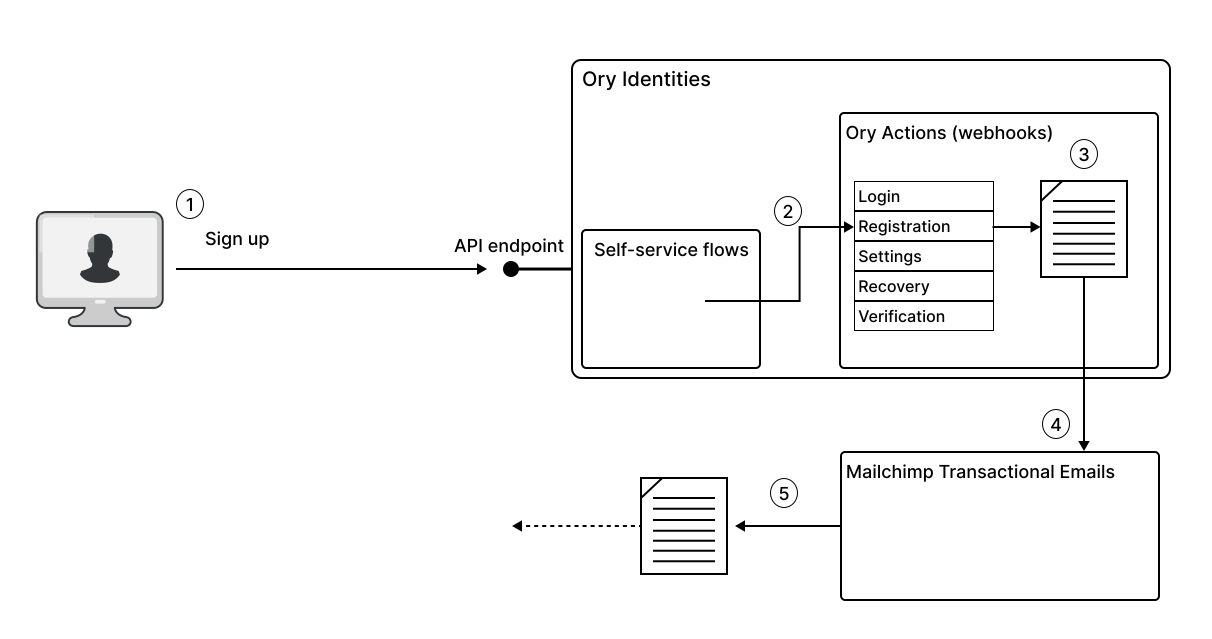
In this example, the transactional email is triggered as follows:
- The end user signs up to a new account, completing the registration self-service flow.
- Upon completion, the registration flow triggers any actions registered under the
flows.registration.after.hookssection of Ory Identities configuration. - The hook for Mailchimp Transactional Email, registered under
flows.registration.after.hooksis now triggered, and Ory evaluates the Jsonnet email template, personalizing the content with the user's name and email address. - The Ory action forwards the content of the email to Mailchimp by invoking an API endpoint on the Mailchimp Transactional Email system.
- Mailchimp imports the email into its email system and then sends the transactional email to the end user on behalf of your email domain.
If you plan to send a transactional email that includes the header From: info@{your-domain}.com, you need to configure Mailchimp
so that it has the authority to send (and receive) emails for the {your-domain}.com email domain.
Create a Mailchimp webhook
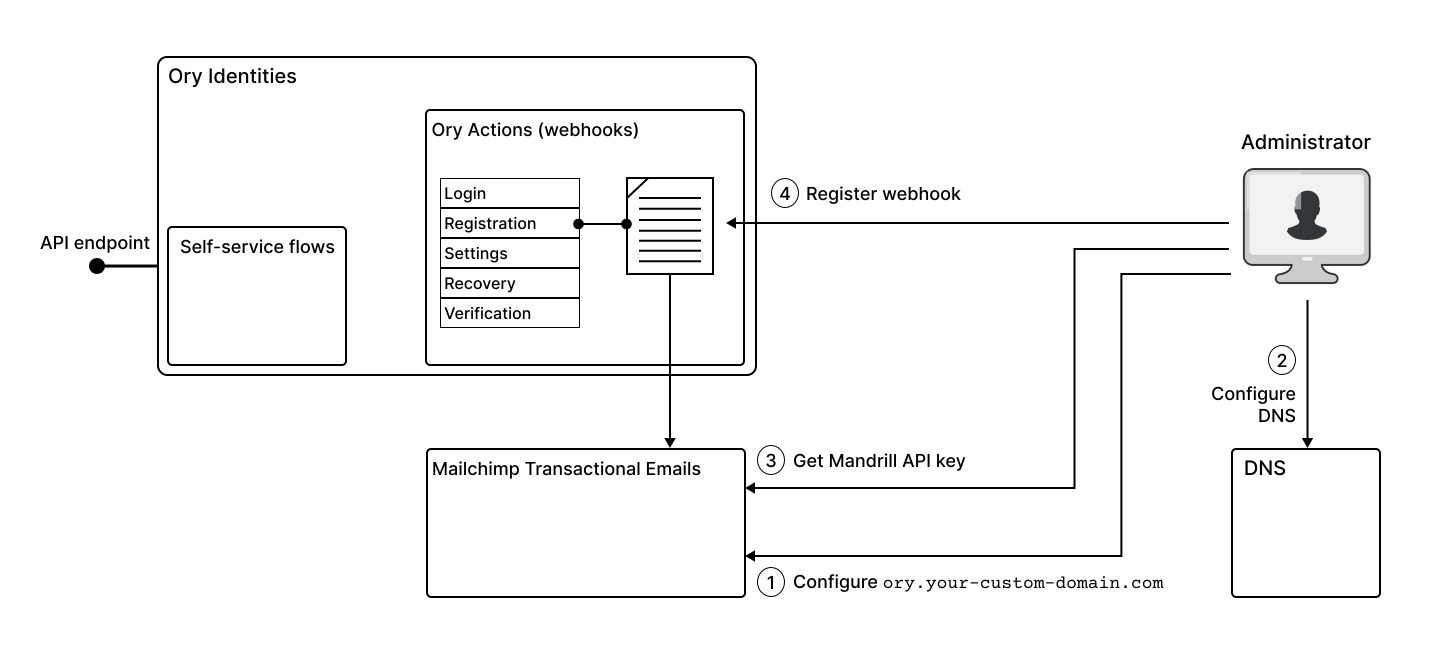
To integrate Mailchimp using Ory Actions, you must complete these steps:
-
Go to the Mailchimp Transactional Email dashboard and add your domain,
{your-domain}.com, as a sending domain. See Add a sending domain in the Mailchimp developer documentation. -
Next, configure your DNS record, so that Mailchimp can act as a trusted email server in your domain. See Configure your DNS in the Mailchimp developer documentation.
-
Create a Mandrill API key to authorize Ory to access the Mandrill API, enabling the system to forward transactional emails to Mailchimp.
noteMandrill and Mailchimp are separate applications that have their own API keys. You can't use the Mailchimp API key to interact with Mandrill APIs. To generate a Mandrill API key go to the Settings page on the Mailchimp Transactional Email system dashboard.
-
Using the API key from the previous step, create an Ory Action for triggering a transactional email whenever a user completes the registration flow.
-
Test the integration by signing up with a test account in your Ory Network project and checking that the corresponding user data is updated in Mailchimp.
Configuration
Not sure what Jsonnet is? Read the Ory Actions webhook guide.
-
First, create a Jsonnet file. It transforms the identity data from Ory to a format Mailchimp understands:
infoFor Mailchimp, you must pass the API key in the request body. This means you must include it in the Jsonnet snippet.
./mailchimp_identify.jsonnetfunction(ctx) {key: "{Your-Mailchimp-Api-Key}",message: {from_email: "hello@example.com",subject: "Hello from Ory",text: "Welcome to Ory! Have fun and happy hacking!",to: [{email: ctx.identity.verifiable_addresses[0].value,type: "to"}]}} -
To use this Jsonnet snippet, encode it to Base64 and save it to the clipboard:
cat mailchimp_identify.jsonnet | base64 | pbcopy -
Next, define the Ory Action as a JSON Object. Remember to replace the placeholders with your data.
./webhook-action.json{"hook": "web_hook","config": {"url": "https://mandrillapp.com/api/1.0/messages/send","method": "POST","body": "base64://{ENCODED_JSONNET}"}} -
Finally, add this action to your Ory Network Project using the Ory CLI.
-
You can trigger this webhook after successful registration:
ory patch identity-config --project <project-id> --workspace <workspace-id> \--add "/selfservice/flows/registration/after/hooks/0=$(cat webhook-action.json)" \--format yaml -
Alternatively, you can trigger this action only when the user signs up with a password or social sign-in:
ory patch identity-config --project <project-id> --workspace <workspace-id> \--add "/selfservice/flows/registration/after/password/hooks/0=$(cat webhook-action.json)" \--format yaml
Marketing audience sync
The other Mailchimp subsystem — the marketing campaign tools — manages audiences (subscriber lists) rather than transactional email. Instead of sending a one-off message, this use case adds each newly registered user to a Mailchimp audience so they appear in your marketing CRM automatically.
Like the transactional integration above, it's driven by an Ory Action on registration.after, but it targets Mailchimp's
Marketing (Lists/Audiences) API instead of the Mandrill transactional API.
The Mailchimp Marketing API key is distinct from the Mandrill key used for transactional email above. Generate it from the main Mailchimp dashboard, not the Mandrill dashboard.
How marketing audience sync works
- The user completes registration in your Ory-powered application.
- Ory fires an Action on
registration.after. - The Jsonnet body maps Ory identity traits (email, name, custom traits) into Mailchimp merge fields and audience tags.
- Ory POSTs to Mailchimp's Lists/Audiences API to add or update the subscriber:
- URL:
https://{dc}.api.mailchimp.com/3.0/lists/{list_id}/members - Auth: HTTP Basic, username
anystring, password{marketing_api_key}
- URL:
Setup outline
- Create a Mailchimp Marketing API key from the Mailchimp dashboard.
- Identify the target audience (list) ID in the Mailchimp dashboard.
- Create an Ory Action of type
web_hookonregistration.after.hookspointing athttps://{dc}.api.mailchimp.com/3.0/lists/{list_id}/memberswith HTTP Basic auth (anystring:{api_key}). - In the body Jsonnet, map
identity.traits.emailandidentity.traits.nameinto Mailchimp merge fields.
See the Mailchimp Marketing API reference for the full member schema and available merge fields.